Everything for the adhan at home
Set it up once with the remote. After that AdhanTV takes care of every prayer time by itself.
More than a prayer-times app
AdhanTV is built for daily life at home. These are the parts that make the difference.
Set up in five minutes
At the first start a wizard guides you through six short steps with the remote: language, your prayer times, the permissions, the prayer break, the look and a test. It even shows what the Android screens look like. The test proves it works: put the box in standby and two minutes later the adhan plays.
Prayer break: away from the TV
After the adhan a calm screen with a countdown stays over everything for 5 to 30 minutes, and other sound stays off. The film or the match waits, so nobody misses the prayer. Hold OK for 3 seconds to end it early.
Dua after the adhan, as you like
When the adhan has finished, the dua appears on screen in Arabic with its meaning. Choose one of the recitations, add your own, or show only the text, without sound. Or switch it off.
Screensaver with the 99 Names
When the TV is idle, the 99 Names of Allah appear one by one, in Arabic with transliteration and meaning, together with the time and the next prayer.
A look that suits your home
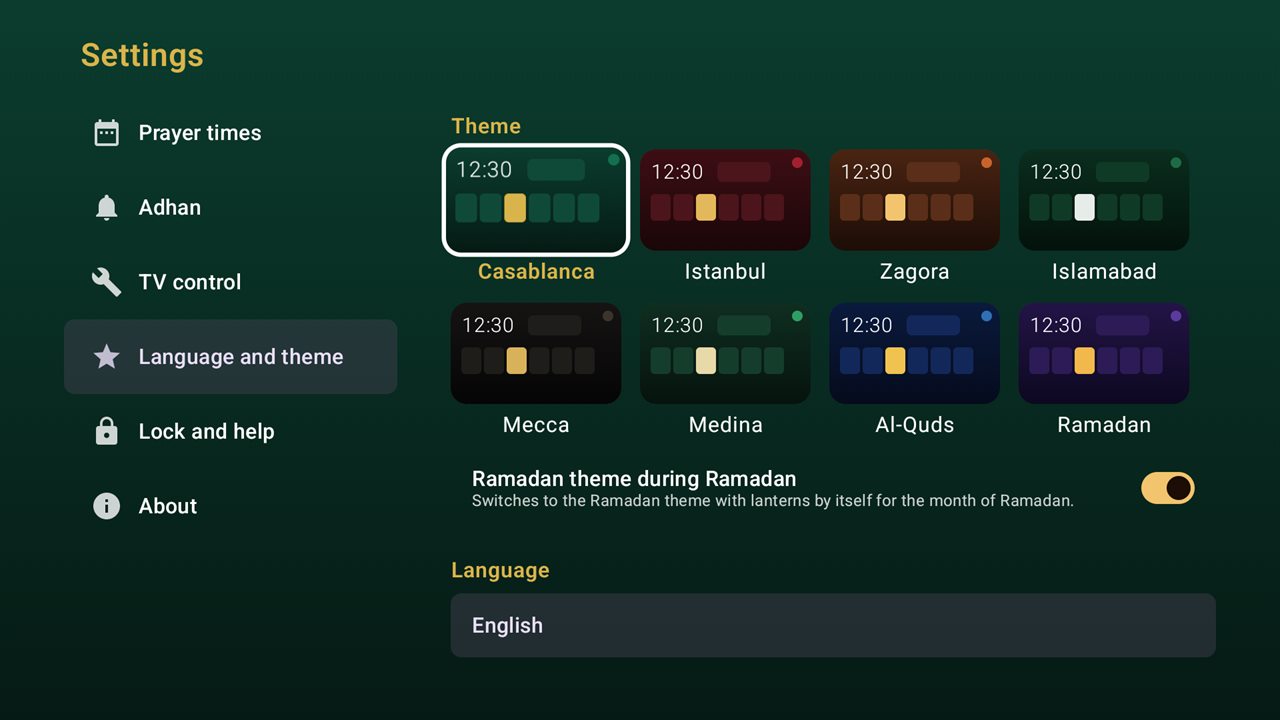
Eight themes with calm drawn backgrounds: Casablanca, Istanbul, Zagora, Islamabad, Mecca, Medina, Al-Quds and Ramadan. Choose the colours you like; the whole app follows.
Parental lock
Lock the settings with a 4-digit PIN. Children can't change the times, the adhan or the volume, while the home screen and the adhan keep working as usual.
Ramadan theme
If you want, the app switches by itself to the Ramadan theme for the month of Ramadan, with glowing lanterns and "Ramadan Mubarak" on the home screen. The month follows the Islamic date you chose.
Made for the TV, not for your phone
AdhanTV is an Android TV app. It runs on the device that is connected to your TV and is used with the remote control.
- Android TV boxes and set-top boxes
- Google TV devices
- Smart TVs with Android TV or Google TV
- Android 7.0 or newer
AdhanTV does not work on phones and tablets, or on TVs with another system such as Tizen or webOS. It is made for Android TV and Google TV; Amazon Fire TV (Fire OS) is not supported. The TV only switches on with the box when HDMI-CEC is on.
Turn your TV box into an adhan clock
Free, no ads and no account. Download the APK or follow the step-by-step guide.
On your phone? AdhanTV does not work on a phone. Open Downloader on your TV box and type adhantv.net/apk.